
Insights · Lean & Smartsheet
Tiered daily huddles in Smartsheet: a QDIP board that runs itself.
Whiteboard huddles work in the room and disappear outside it. Here’s how to build a QDIP board in Smartsheet that the floor can update in seconds, that escalates on its own, and that leadership can read without walking the plant.

Michael Ortiz Founder & Principal, Portico Group
November 2026 · 6 min read
Key takeaways
- QDIP tracks four things every shift: quality, delivery, inventory, and productivity. Add an S if safety belongs on the board.
- Tiers turn a daily huddle into a daily management system. A problem the floor can’t fix moves up a level the same day.
- In Smartsheet, the build is small: one entry form, one daily log, one open-items list, and one board per tier.
- The rules matter more than the tool. Every red needs a reason and an owner, or the board turns into wallpaper.
Most plants I walk into already have a huddle board. It’s a whiteboard by the line, with a grid of letters and a marker on a string. On a good day, the team gathers at the start of the shift, colors in yesterday’s results, and talks through what went wrong.
The trouble starts when the meeting ends. The notes get erased tomorrow. Nobody can see a trend. The supervisor who needs to escalate a problem has to find the right manager in person. And leadership only learns what happened by walking the floor or waiting for a weekly report.
A digital board doesn’t replace the huddle. It makes what happens in the huddle last.
What QDIP measures
- Quality. Did we make it right? Defects, scrap, rework, or customer complaints.
- Delivery. Did we ship on time? Orders out the door against the plan.
- Inventory. Do we have what we need, and not too much? Shortages, stockouts, or material waiting on the floor.
- Productivity. Did we hit the plan with the hours we had? Output per labor hour, or units against target.
Many sites add S for safety and run SQDIP. Either way, each letter gets a simple daily call: green if the target was met, red if it wasn’t. The value isn’t in the color. It’s in the conversation a red forces.
Why tiers matter
A single huddle tells one team how it did. Tiered huddles connect the teams to the people who can remove what’s in their way. Each tier meets briefly, in order, every day.
- Tier 1, start of shift. The frontline team and its lead. About ten minutes at the board. Yesterday’s results, today’s plan, and any problem the team can’t solve on its own.
- Tier 2, a couple of hours later. Supervisors and the area manager. They review every tier 1 board, clear what they can, and assign owners to the rest.
- Tier 3, before midday. Plant or site leadership. They see only what tier 2 couldn’t resolve: the cross-department issues, the capital asks, the decisions.
Run well, a problem spotted on the floor at 7 a.m. reaches someone with the authority to fix it before lunch. That’s the whole point.
Building it in Smartsheet
The build is smaller than most teams expect. Four pieces carry it.
- One entry form per area. A short form the lead fills out on a phone or a shared tablet: a red or green call for each letter, a reason code for each red, and a note. If it takes more than a minute, people will skip it.
- One daily log. Every form lands as a row in a single sheet, one row per area per day. That log is the history whiteboards never had, and it feeds every trend chart.
- One open-items list. Each problem becomes a row with an owner, a due date, a status, and an escalate checkbox. Checking the box moves the item onto the next tier’s report automatically.
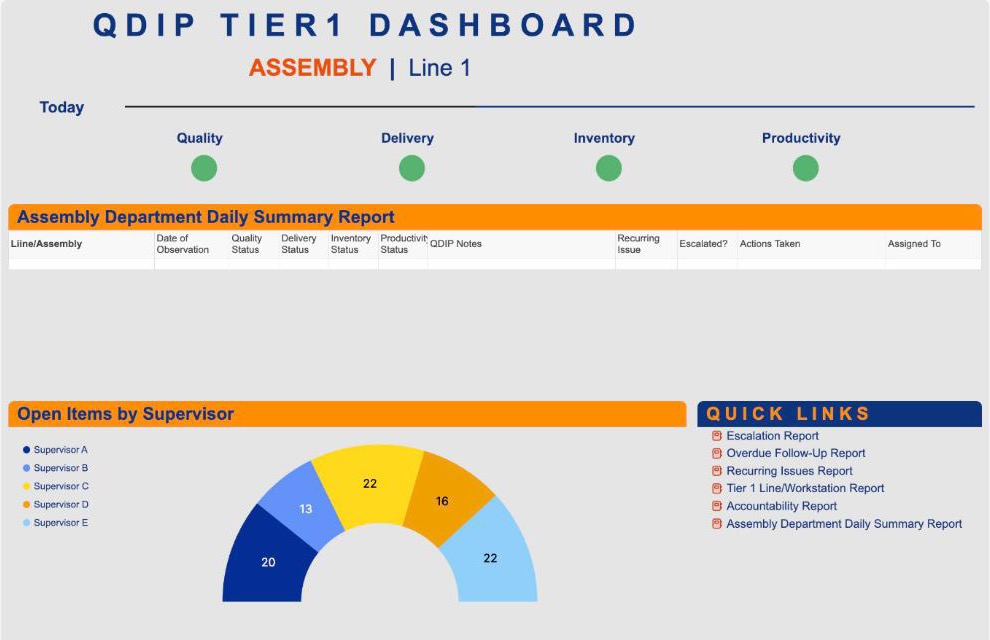
- One board per tier. A dashboard on the TV by the line for tier 1, a roll-up across areas for tier 2, and a site view for tier 3. Each board reads from the same log and the same list, so every tier sees the same facts.
Automations do the rest. A reminder goes out if an area hasn’t posted by the start of its huddle. Owners get an alert when an item is assigned to them, and again when it goes past due.
The floor updates the board in under a minute. Leadership reads it from anywhere. Nobody rebuilds a report by hand.
Rules that keep it alive
- Every red gets a reason and an owner before the huddle ends
- If a team can’t fix it within a day, it escalates. No exceptions, and no blame for escalating
- The huddle runs off the board. People talk about the work, not about updating the tool
- Keep each tier to about fifteen minutes. Problem-solving happens after, with the right people
- Close the loop. When tier 3 resolves an item, the team that raised it hears back
- Review the trend weekly. A letter that’s red every Tuesday is a process problem, not a bad day
Where boards usually fail
Most failures look the same. The board tracks too many measures, so nothing stands out. Reds get recorded but nobody owns them, so the team stops believing anything will change. Leadership skips tier 3 for a few weeks, and escalations pile up with no one to receive them. Or entry is so slow that leads fill it out at the end of the week from memory.
Every one of those is a design choice, and every one can be fixed. Fewer measures. An owner on every red. A standing tier 3 slot on leadership calendars. An entry form short enough to finish standing up.
A 30-day starting plan
- Week 1. Pick one area. Agree on the letters, the target behind each one, and the reason codes for a red.
- Week 2. Build the form, the daily log, the open-items list, and the tier 1 board. Test it with the lead who will use it.
- Week 3. Run tier 1 every day. Fix whatever slows the entry down.
- Week 4. Add tier 2 and the escalation step. Decide which area goes next, and when tier 3 joins.
When to bring in help
A single area can usually be set up in house. Outside help earns its keep when you’re rolling tiers out across several sites, when the board has to pull from ERP or quality systems, or when the daily management habit itself needs coaching, not just the tool. The board is the easy part. The habit is the work.
Common questions
What does QDIP stand for?
Quality, delivery, inventory, and productivity. Many sites add safety and call it SQDIP. Each letter gets a daily green or red call against a target, reviewed in a short huddle at the start of the shift.
Can Smartsheet replace a physical huddle board?
It can, and it adds what a whiteboard can’t: history, trends, automatic escalation, and a view leadership can open from anywhere. Many teams keep the huddle at the same spot on the floor and simply put the Smartsheet dashboard on a TV there.
How long should a tier 1 huddle take?
About ten to fifteen minutes. Cover yesterday’s results, today’s plan, and any problem the team can’t solve alone. Deeper problem-solving happens after the huddle, with only the people it involves.
Read it